
Host a Backend Service with Graftcode Gateway
Goal
Turn your own code into a discoverable backend service using Graftcode Gateway on your local machine - no controllers, no REST routes, no OpenAPI specs.
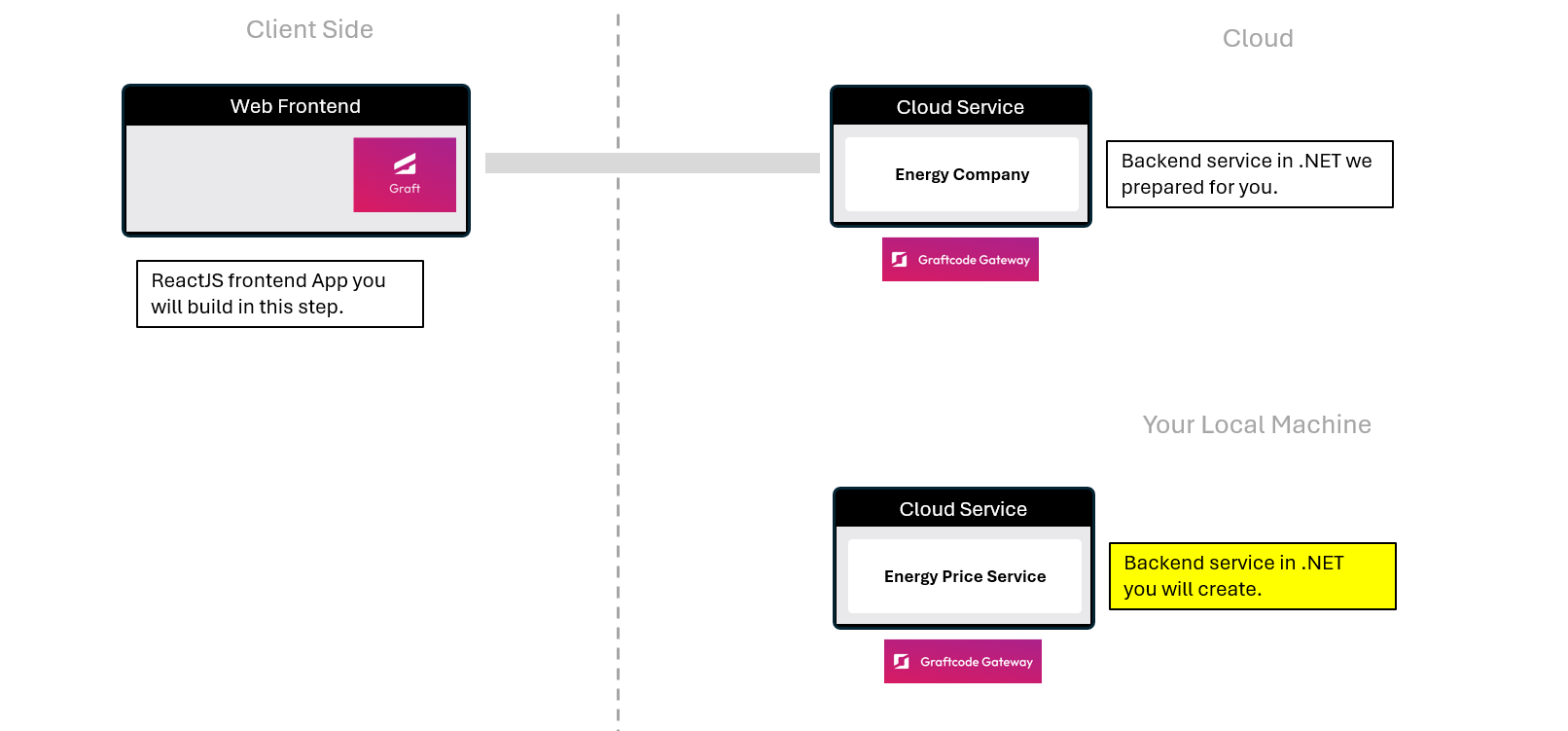
What You'll See
- You'll clone a simple .NET library app with a single public method.
- You'll expose it through Graftcode Gateway using a lightweight Dockerfile.
- You'll instantly get a GraftVision portal - like Swagger, but smarter and ready to be called from most popular languages with just one command.
- You’ll see how, without controllers, DTOs, or REST endpoints, Graftcode makes your business logic or plain object facade methods directly callable, with no coupling to any specific communication technology.
Step 1. Clone the .NET backend service
Return to terminal window and navigate back to the root folder you created for this tutorial. Next clone the prepared .NET energy price service from GitHub and open the project in your IDE by pasting these commands:
git clone https://github.com/grft-dev/dotnet-energy-price-service.git
cd dotnet-energy-price-service
code .
This is a very simple service that already contains the energy price logic with a public method GetPrice() ready to be exposed through Graftcode Gateway. The code of the class EnergyPriceCalculator.cs that will expose EnergyPriceCalculator is as simple as this:
namespace MyEnergyService;

public class EnergyPriceCalculator
{
    public static double GetPrice()
    {
        return new Random().Next(100, 105);
    }
}
Step 2. Expose the service with Graftcode Gateway
To expose this service to the outside world, we've created a dockerfile in your project root for you. This file tells Docker how to build and run your service with Graftcode Gateway. The dockerfile is simple and looks like this:
FROM mcr.microsoft.com/dotnet/aspnet:9.0

WORKDIR /usr/app

# Install wget, python3 + python3-dev and download GG
RUN mkdir -p /usr/app \
 && apt-get update \
 && apt-get install -y \
    wget \
    python3-dev \
 && wget -O /usr/app/gg.deb \
    https://github.com/grft-dev/graftcode-gateway/releases/latest/download/gg_linux_amd64.deb \
 && dpkg -i /usr/app/gg.deb \
 && rm /usr/app/gg.deb \
 && apt-get clean \
 && rm -rf /var/lib/apt/lists/*

# You just need to copy your binaries with public interfaces
COPY /bin/Release/net8.0/publish/ /usr/app/

EXPOSE 80
EXPOSE 81
# And run Graftcode Gateway passing name of modules that should be exposed
CMD ["gg", "--modules", "/usr/app/MyEnergyService.dll"]
Now, let's build and run your Docker container with the following commands. Please note that you need to have Docker installed and running on your machine to execute these commands:
dotnet build .\\MyEnergyService.csproj
dotnet publish .\\MyEnergyService.csproj
docker build --no-cache --pull -t myenergyservice:test .
docker run -d -p 80:80 -p 81:81 --name graftcode_demo myenergyservice:test
Step 3. Explore your service with Graft Vision
Open your browser at the following URL to see your service in action through Graft Vision: http://localhost:81/GV
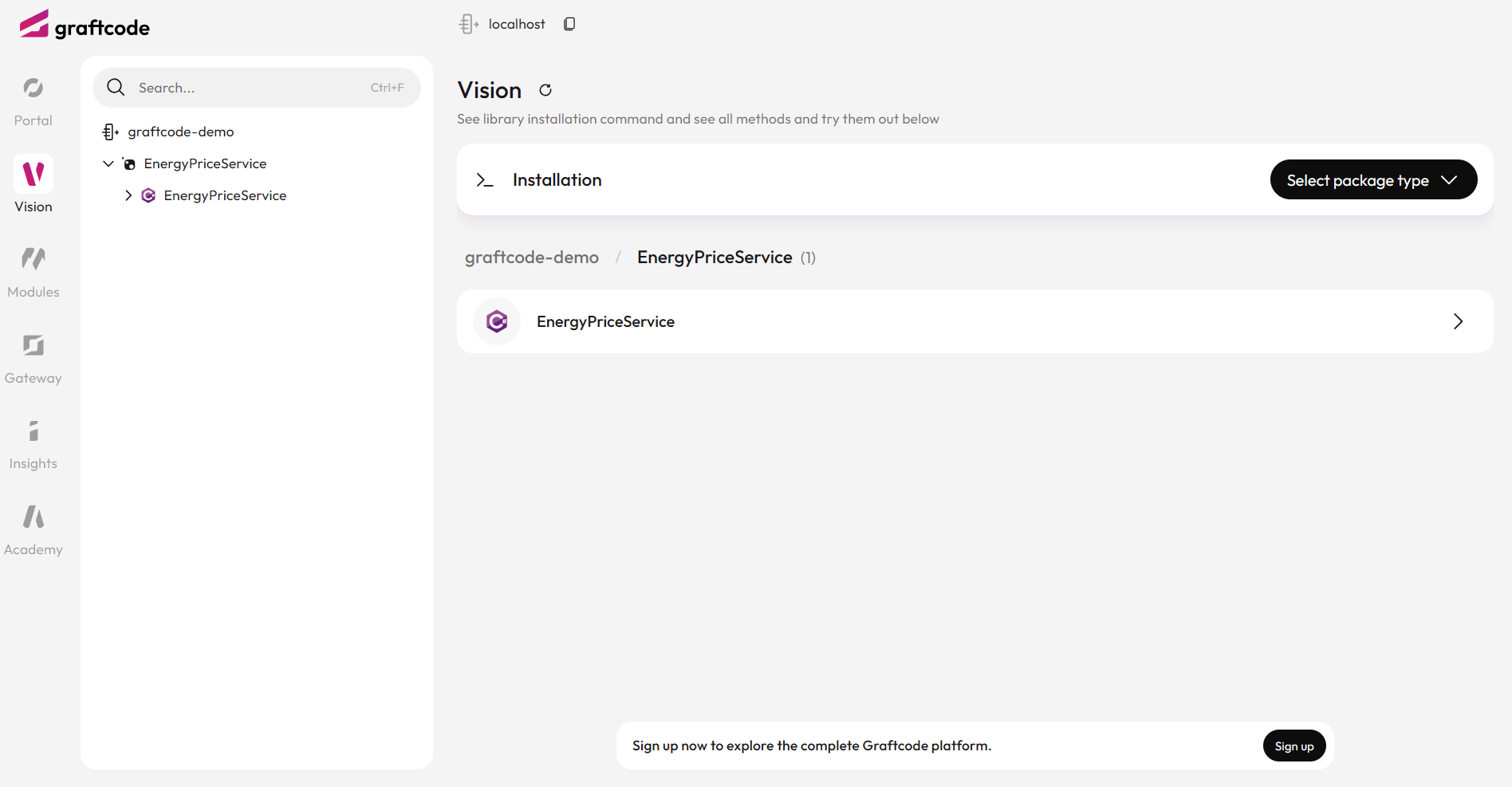
Notice that:
- Graftcode Gateway can easily run as container on your machine or in cloud.
- Instantly it hosts Swagger-like UI with all exposed public methods.
- You can see all methods exposed by your service and "Try it out" button to call them live.
- You can easily find a command to install the Graft package using your favorite package manager allowing you to call this service from any language.
That's it! Your .NET method is now exposed as a backend service with Graftcode Gateway and can be called from any frontend web or mobile app or even another backend service.
Step 4. Compare: old-way vs. Graftcode way
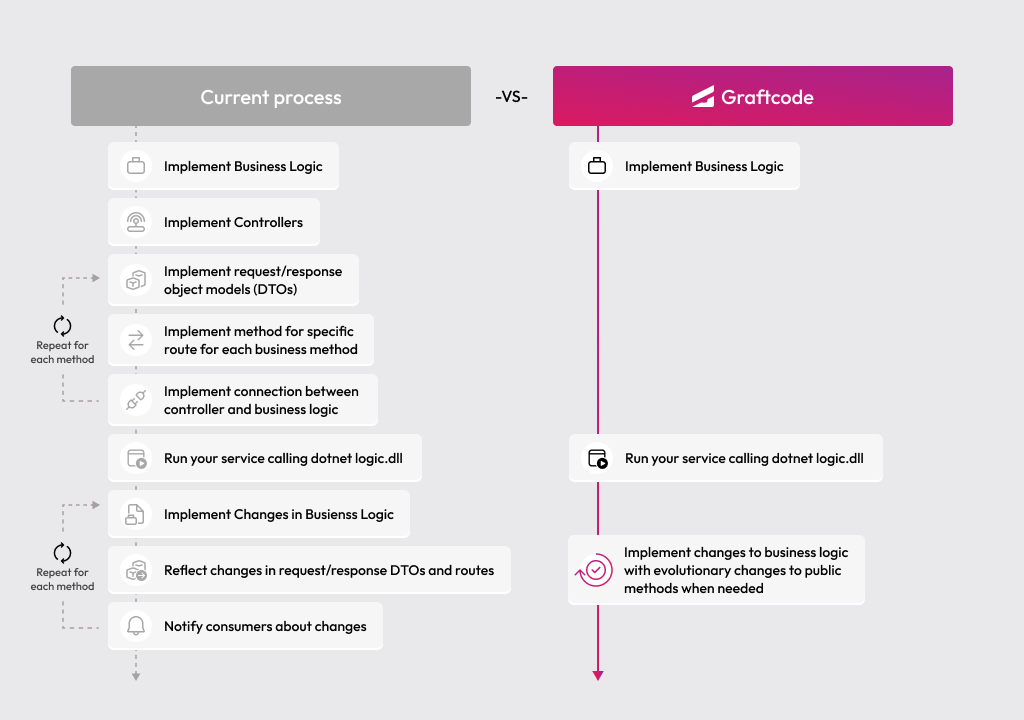
Check this chart to understand how your daily process of exposing backend logic for remote consumption will change with Graftcode:
Note
⚡ Result: You've turned a plain .NET method into a fully accessible backend service with one simple Dockerfile and few Docker commands to run, saving hours of manual coding and maintenance. No controllers, no REST endpoints, no OpenAPI specs. Just a public methods exposed through Graftcode Gateway.