
Connect Backend Services
Goal
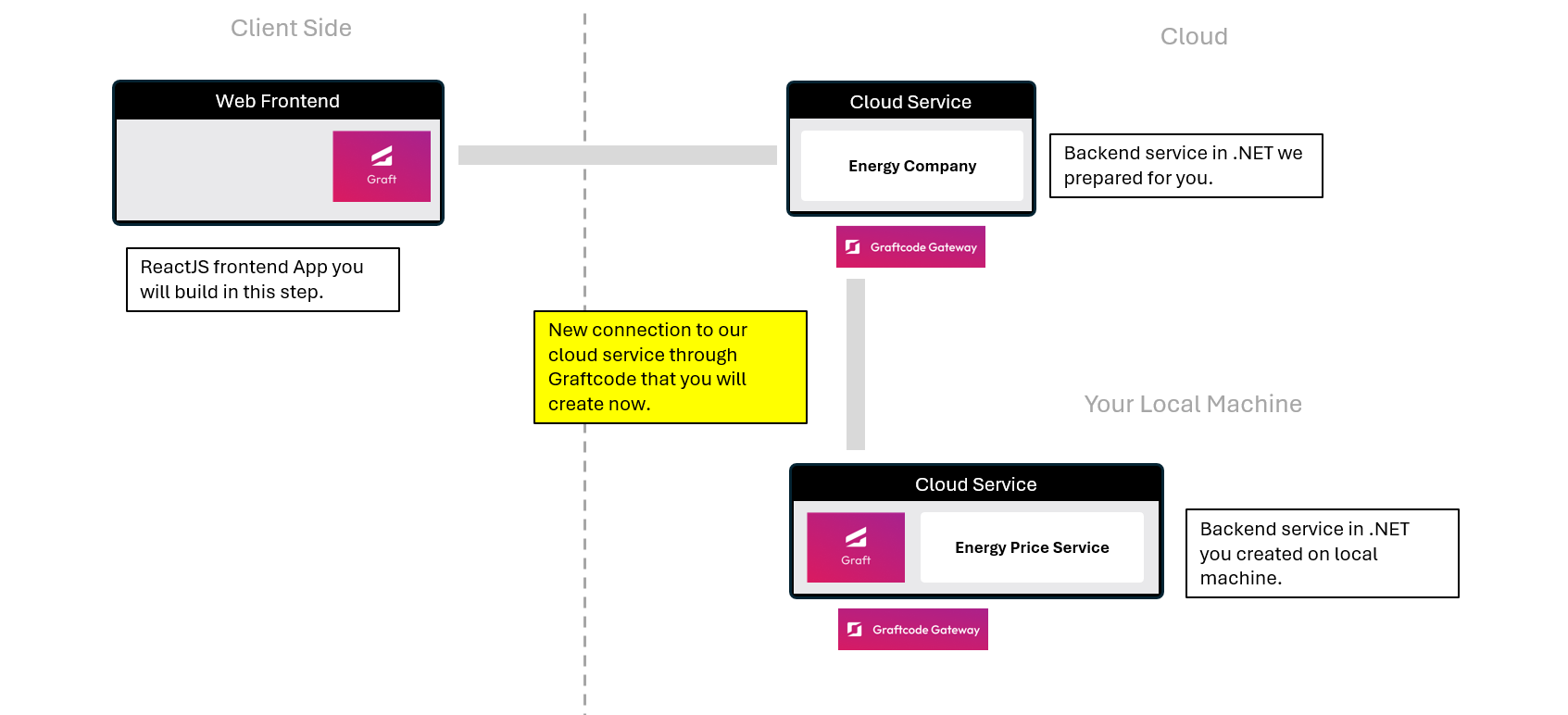
Services exposed with Graftcode can be consumed from frontend or other backend services too. In both cases you will always get instant effortless connection and highest performance. Learn how to connect the .NET app that you've built in the previous step "Host a Backend Service with Graftcode Gateway" section to cloud service that we were consuming from ReactJS app.
What You'll See
- You'll connect your previously hosted .NET backend service to our Energy Company cloud service that we prepared for you.
- You'll use the provided dotnet command to add the service as a direct dependency and obtain Graft.
- You'll find and explore the NetConsumptionKWh method using strongly-typed Graft between .NET services.
Step 1. Check GraftVision URL again
Open the GraftVision that we've already hosted for .NET service. You can find it under this URL: GraftVision portal
In GraftVision portal locate the NetConsumptionKWh method under the Meter Logic section. This is the method we'll be implementing in your .NET app.
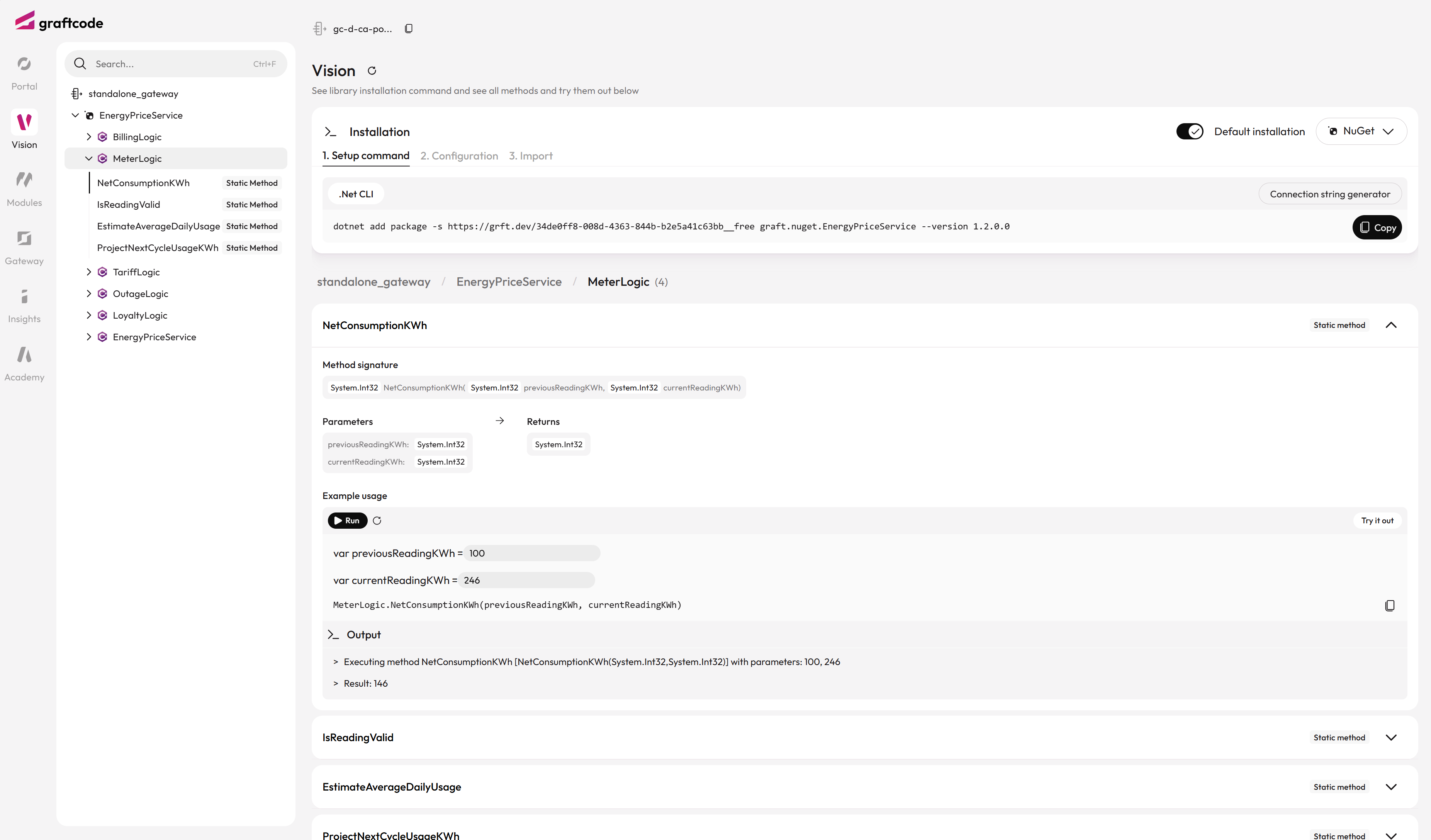
In the GraftVision portal, you can:
- See the generated package manager command for your selected technology, allowing you to install the service as a strongly-typed dependency
- View all available methods and their signatures
- Try out these method by inserting parameters and seeing the result
- See the expected input parameters and return types
Step 2. Connect to this service using Nuget
Since this is a .NET application, we'll now select Nuget as our package manager from the dropdown menu in the GraftVision portal. Let's take the command and run it in your terminal window.
dotnet add package -s https://grft.dev/7c81a896-630e-4abf-9b47-0e8adcca9183__free graft.nuget.energypriceservice --version 1.2.0
Step 3. Add usings and configure the connection
Now let's add usings to your MyEnergyService.cs file to use the new Graft.
using graft.nuget.EnergyPriceService;
Create a static constructor for your EnergyPriceCalculator class and add the following line to configure the connection to the remote service (remember, you can set the configuration in multiple ways - code, env variable or config file):
static EnergyPriceCalculator()
{
    graft.nuget.EnergyPriceService.GraftConfig.Host="wss://gc-d-ca-polc-demo-ecbe-01.blackgrass-d2c29aae.polandcentral.azurecontainerapps.io/ws";
}
Step 4. Use the method
And add new method to EnergyPriceCalculator class which returns current cost retrieving consumption calculated by remote cloud service and multiplying by generated random price. Add this code to your MyEnergyService.cs file, below the GetPrice() method, and remeber to Save it:
public static double GetMyCurrentCost(int previousReadingKwh, int currentReadingKwh)
{
    var consumption = MeterLogic.NetConsumptionKWh(previousReadingKwh, currentReadingKwh);
    return consumption * GetPrice();
}
The method call is:
- Strongly-typed - You get full IntelliSense and compile-time type checking
- Always in sync - The client automatically reflects any changes made to the backend service
- Direct integration - No REST calls, DTOs, or manual client code needed
Focus on the way how your interaction with remote service looks like. It is fully decoupled from architecture or communication channel and feels like local method.

Step 5. Build and test your updated service
Now let's build and publish your project:
dotnet build .\\MyEnergyService.csproj
dotnet publish .\\MyEnergyService.csproj
Build the Docker image again and run it to test your updated service with the new GetMyCurrentCost method.
Stop Docker container if it's running, remove it and run again by executing the following commands:
docker stop graftcode_demo
docker rm graftcode_demo

docker build --no-cache --pull -t myenergyservice:test .
docker run -d -p 80:80 -p 81:81 --name graftcode_demo myenergyservice:test
Once your container is running, open Graftcode Vision portal at: http://localhost:81/GV
In the portal:
- Navigate to explore the new GetMyCurrentCost method
- Insert parameters for:
- previousReadingKwh (e.g., 100)
- currentReadingKwh (e.g., 150)
- Hit the Run button to see the live results
- Review the response format and data structure
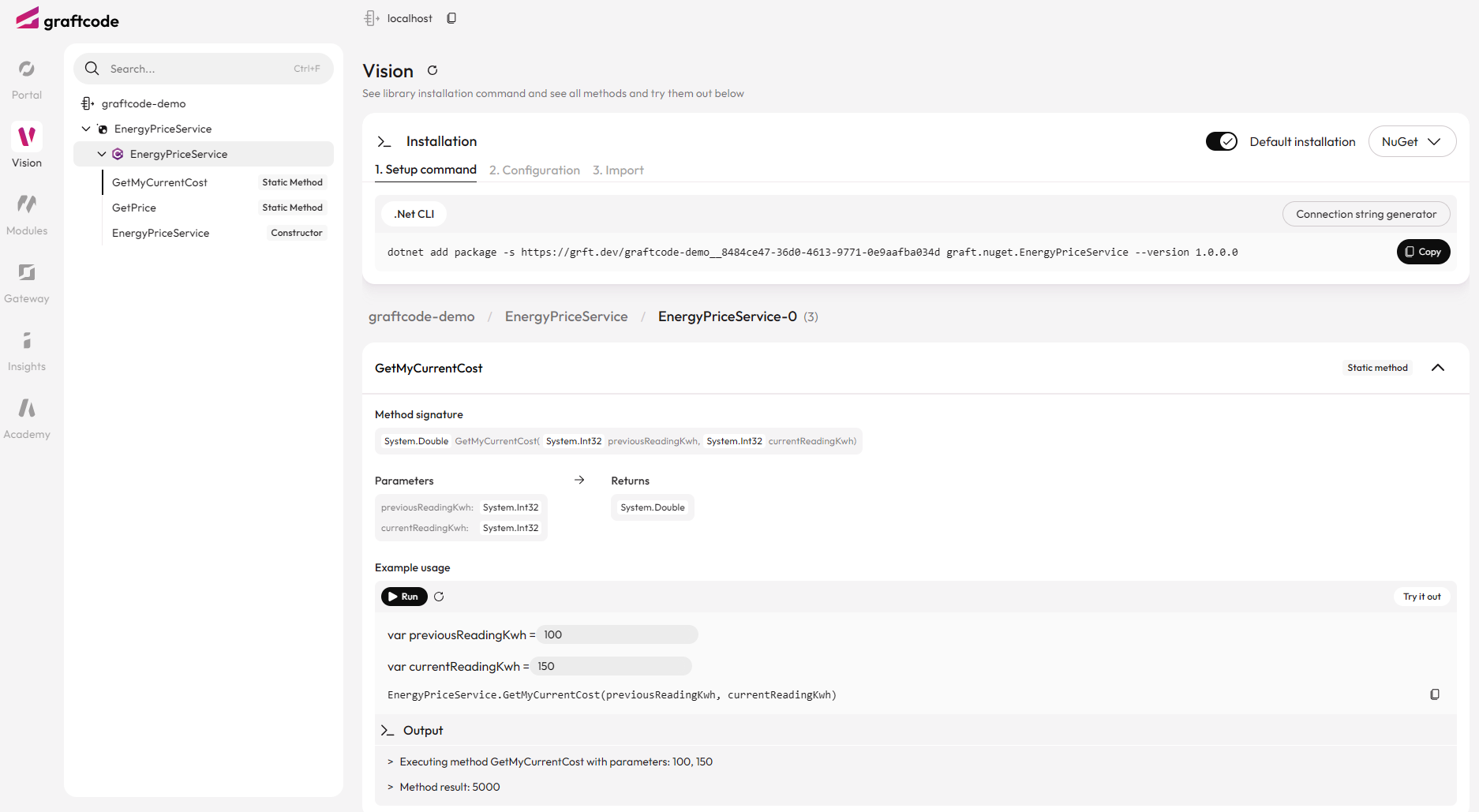
This allows you to test your enhanced method that combines the NetConsumptionKWh calculation executed on our cloud service with cost pricing implemented in your local module. Trying it in browser let you make sure it works as expected before using it in your applications.
Important
This example is proving that Graftcode not only covers the edge connection from Web app or mobile client to cloud backend but also allows to integrate across microservices. It all works regardless if module with your business logic is hosted in cloud, locally on your machine or within container. From code perspective the NetConsumptionKWh method behaves exactly like a local function in your codebase, but it's actually executing on the remote backend service keeping your code decoupled from system architecture.